
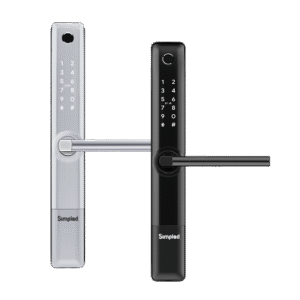

In today’s digital world, home security is evolving faster than ever, and one of the most popular innovations is the electronic door locks. These devices offer convenience, allowing you to lock and unlock doors remotely via smartphone apps, voice assistants, or even biometric scans. For many homeowners, smart locks represent a new level of home automation that promises enhanced security and ease of access.
However, with the rise of smart technology, new security concerns also emerge. While smart locks offer greater control and convenience, they aren’t immune to vulnerabilities. As these locks are connected to the internet and integrate with your home network, smart lock security issues have become a topic of growing concern.
In this article, we’ll explore the potential security issues with smart locks and how you can protect your home from these risks. Whether you’re considering installing a smart lock or already using one, it’s important to understand these risks and how to mitigate them to ensure the safety of your home.
The Growing Popularity of Smart Locks
Convenience Meets Security
The appeal of smart locks is undeniable. Gone are the days of fumbling for keys or worrying about lost duplicates. With a smart lock, you can:
Remotely control access: Lock and unlock doors from anywhere using your smartphone or app.
Set temporary access codes: Perfect for guests, service personnel, or housekeepers.
Monitor activity: Receive notifications about who is entering or exiting your home.
Integrate with other smart devices: Smart locks often work with home security systems, cameras, and even voice assistants like Amazon Alexa or Google Assistant.
However, these conveniences come with certain risks. The reliance on smart lock technology can expose you to vulnerabilities that traditional locks don’t face. So, while the future looks bright for keyless entry, it’s important to evaluate potential smart lock security issues thoroughly.
Common Smart Lock Security Issues
1. Vulnerabilities in Software and Firmware
One of the primary concerns when it comes to smart lock security is the software that powers these devices. Smart locks, like any other connected device, rely on software that can have bugs or security flaws. These flaws can leave your smart lock susceptible to attacks.
How Software Vulnerabilities Work
Firmware Exploits: Hackers may exploit vulnerabilities in a smart lock’s firmware to bypass security measures and gain unauthorized access. Manufacturers regularly release firmware updates to patch these security holes, but not all users keep their devices up-to-date.
Weak Encryption: Encryption is crucial for securing communications between your lock and the connected app. If a smart lock uses weak or outdated encryption, attackers can intercept data, such as access codes or lock status, and manipulate it for malicious purposes.
How to Mitigate This Risk:
Ensure that your smart lock receives regular software updates from the manufacturer.
Check that the smart lock uses strong encryption methods, such as AES-128 or better.
2. Hacking and Remote Attacks
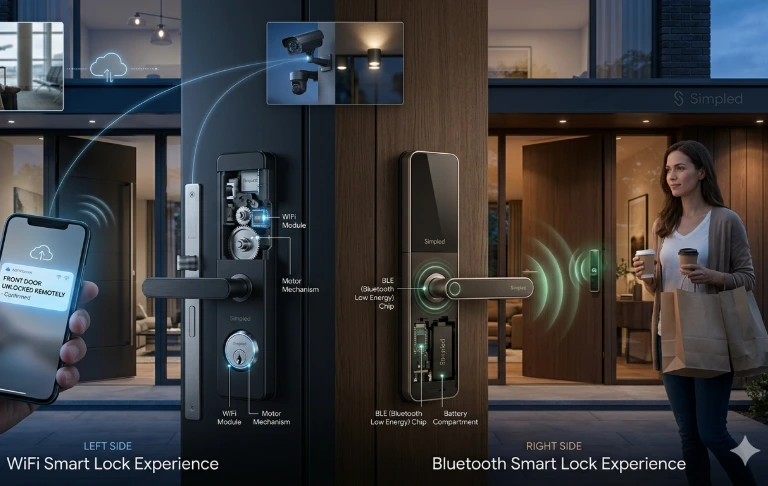
Another serious smart lock security issue involves remote hacking. Many smart locks connect to your home’s Wi-Fi or a Bluetooth network, allowing you to control them from anywhere. However, this wireless communication can be intercepted by hackers if not properly secured.
How Remote Attacks Work
Wi-Fi and Bluetooth Vulnerabilities: If a smart lock is poorly configured or lacks strong encryption, hackers can potentially gain access remotely via Wi-Fi or Bluetooth. For example, Wi-Fi-connected locks might be targeted by attackers using advanced techniques like brute force or credential stuffing to guess your access password.
Weak Passwords and Default Settings: Many smart locks are installed with factory default passwords, which are often easy for hackers to guess. If users fail to change these defaults, their locks are at risk.
How to Mitigate This Risk:
Always change default passwords and use strong, unique passwords for both your smart lock and the associated app.
Enable multi-factor authentication (MFA) where available, which adds an additional layer of security beyond just a password.
3. Bluetooth and Signal Interference
Bluetooth-enabled smart locks rely on short-range wireless technology to communicate with your smartphone or other devices. While Bluetooth is generally considered secure, it can still be susceptible to interference and exploitation.
How Bluetooth Attacks Work
Bluejacking and Bluesnarfing: These are attacks that exploit Bluetooth connections to send unsolicited messages or gain unauthorized access to devices. While rare, these attacks can compromise the security of Bluetooth-enabled smart locks.
Signal Interference: In some cases, the Bluetooth signal can be jammed or blocked, preventing you from using the lock when you need it. This can be a serious inconvenience if you’re locked out of your home.
How to Mitigate This Risk:
Keep your Bluetooth connections secured and limit pairing to trusted devices only.
Regularly check that your smart lock’s Bluetooth function is updated with the latest security protocols.
4. Physical Access and Bypass Techniques
Though smart locks are designed to be more secure than traditional locks, they’re not immune to physical attacks. Some hackers or burglars may attempt to bypass the lock mechanism itself, especially if they have physical access to the door.
How Physical Bypass Works
Lock Picking: Even though many smart locks are resistant to traditional picking techniques, some cheaper models may still be vulnerable to lock picking or bypass methods.
Battery or Power Failures: Many smart locks rely on batteries, which can fail over time. If someone manages to remove or disable the power source, they may be able to gain access.
How to Mitigate This Risk:
Use a high-quality smart lock that includes tamper detection and anti-picking features.
Regularly check and replace the batteries to ensure your lock remains operational at all times.
5. Privacy Concerns with Data Storage
Smart locks collect data to function effectively, such as who is entering or leaving the house, and when. However, this data can be a potential security risk if not properly protected.
How Data Privacy Issues Arise
Data Breaches: If a smart lock’s manufacturer suffers a data breach, hackers could gain access to sensitive information, such as your access logs or PIN codes.
Cloud Storage Risks: Many smart locks store data on the cloud. While this offers convenience, it also introduces a risk if the cloud server is compromised.
How to Mitigate This Risk:
Choose smart locks from reputable manufacturers with strong privacy policies and encrypted data storage.
Limit the amount of data stored in the cloud, and consider using a local storage option if available.
Monitoring and Technology
In addition to locking up the residence, modern home security systems utilise monitoring technologies that detect unusual activity, verify the occurrence of an access event, and quickly respond to situations where someone might be trying to enter the house, thus providing the homeowner with real-time information to react to incidents.
The technology for generating a complete and coordinated security system consists of smart locks, cameras, mobile phones, and motion sensors that provide comprehensive protection from opportunistic criminals and create a view of common entry points.
Smart Features
Smart security devices perform many more functions than just the capabilities associated with access control. Because of the extensive advanced monitoring features available, homeowners are provided with actionable insights, real-time alerts, and automated security systems.
App Notifications
With real-time notifications, homeowners can stay updated on security incidents as they are happening. Some of the notifications that you may receive will include:
- Locked Doors
- Unlocked Doors
- Tampered Doors
- Failed PIN Entry
- Event Detected
Activity or Access Logs
With activity logs, homeowners can track all activity that an individual has had with their lock. This is especially helpful in accountability because with multiple users and access credentials, homeowners will be able to know who accessed the property and when they accessed it.
It will also help to identify unusual behaviour before it becomes a concern for the homeowner. To maintain awareness of the activity in their home, homeowners should do regular reviews of their access or activity log. This has also been one of the most successful smart door security tips that we provide to our clients.
Auto-lock or Unlock
The auto lock & unlock capability of today’s smart locks is the perfect remedy for one of the most commonly occurring security risks, human error. The auto lock capability allows the homeowner to set a timeframe (adjustable in many cases via the app) after which the lock will secure itself. To verify proper functioning:
- Check to see if your door opens properly.
- Test your automation settings regularly.
Scheduled Guest Access
Scheduled guests provide you with control of how many temporary visitors you allow inside your home. Instead of giving out permanent access codes to your guests, a homeowner can create an access code that will cancel after a certain amount of time.
Scheduled access, along with activity logs and notifications through the application, provides you with convenience and security. This feature will allow you to leave your door open for these types of scheduled guests:
- Cleaning crew
- Handyman
- Dog Walker
- Property manager
- Short-term rental occupant
Maintenance
Even a high-end smart lock can become an easy target for someone who is not careful with its upkeep. The same holds true for homeowners and their locks.
Regular Battery Checks
Power management is essential for smart lock reliability. Your batteries should be:
- Do not mix battery brands.
- Have a backup entry if you do run out of battery power.
Firmware Updates
Firmware updates can significantly enhance the ability of your devices to withstand new cyber threats. Keeping the firmware of your smart lock updated is one of the most essential best practices in smart lock security and is something that should never be overlooked. By regularly providing updated firmware, manufacturers can:
- Enhance the performance of the connected device.
- Add new functionality or features to the connected device.
- Increase the connected device’s ability to integrate with smart home platforms.
Cleaning Sensors or Readers
Biometric systems require highly sensitive sensors operating correctly to perform their functions.
Mechanism Alignment
Although Smart Locks use very advanced technology, the physical alignment of the device is equally important and can affect the performance of the smart lock’s mechanical components.
By routinely checking the alignment of the door/lock, homeowners will be able to find misalignments prior to either event affecting the security of the home. The following are indicators of the need to check the alignment of the door/lock system:
- Loose hinge
- The door is rattling.
- The Lock is difficult to actuate, requiring excessive force.
Daily Routines
Daily habits enable the optimal function of technology. Many break-ins that take place are not a result of technology failure, but simply because of the user’s mistake. Implementing good security habits greatly increases the level of security.
Keep Keys Out of Sight
While some people may have advanced smart locks, they may still rely on physical keys as a backup mode of entry. However, many homeowners damage their security by leaving a spare or emergency key in “typical” locations near their front door.
Keys should not be left on visible hallway tables, window ledges, key hooks beside the front door, or anywhere a burglar could see them through visible glass. Burglars routinely scout for vacant homes with easy access to keys, and often use tactics such as “letterbox fishing” to retrieve them by inserting their arm into a mail slot or small opening.
A better way to protect your keys is to use a high-quality key safe which has been installed in a discreet area away from the main entrance of your home.
Change Codes Periodically
Access credentials should never be used for long periods of time without being changed. A regular code rotation reduces potential exposure and limits the potential damage done if your credentials are compromised. Immediately change your PIN if:
- You no longer need access to the location.
- Your device has been lost.
- Do you have any reports of suspicious activity?
- A visitor’s temporary access has ended.
Changing codes on a periodic basis is always one of the best ways to protect your access control.
Everyday Frustrations Driving Smart Lock Adoption
One reason smart locks are becoming popular across UK homes is the frustration people face with traditional keys. Losing keys often means changing the entire lock, which can be both costly and inconvenient. Carrying a bunch of keys is another annoyance, especially for busy families or landlords with multiple properties.
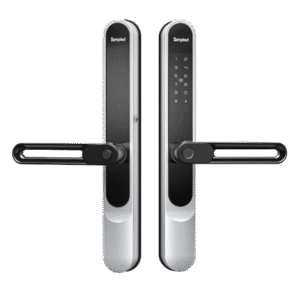
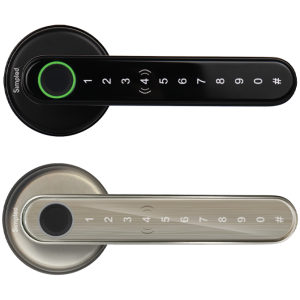
Smart locks like the Simpled SS Slim and SF Slim solve these issues by replacing keys with fingerprint, code, or app access. This not only eliminates the hassle of key management but also introduces features like remote control and temporary access codes—a game-changer for anyone managing cleaners, guests, or Airbnb rentals.
Battery Life and Power Outages: The Biggest Customer Concerns
For many homeowners considering smart locks, the first question is: What happens if the battery dies or the Wi-Fi goes down?
Battery Worries: Smart locks are designed with long-lasting batteries. Simpled’s BLE-powered locks use ultra-low energy consumption, ensuring batteries can last months—even years—with normal use. Most models also provide low-battery alerts well in advance.
Power & Wi-Fi Outages: If your Wi-Fi goes down, local features like fingerprint or code entry still work. And in the event of a complete power failure, most smart locks include a mechanical override key or an emergency charging port.
This reassurance is vital for homeowners and Airbnb hosts who need uninterrupted access at all times.
Smart Locks for Airbnb and Rental Properties
While most homeowners ask the same questions about smart locks, Airbnb hosts and landlords often highlight one specific challenge: reliable connectivity. If a property has unstable Wi-Fi, managing remote access can become tricky.
This is why many UK hosts prefer locks with offline-capable features (like PIN codes or fingerprint access) in addition to app control. Simpled’s range includes models designed for high-turnover use, making it easy to issue and revoke codes instantly—no need to meet guests in person.
Door Compatibility: A Step Often Overlooked
One of the most frequent issues raised by customers isn’t hacking—it’s door compatibility. UK homes often use multipoint locking systems, and not every smart lock fits directly.
Before purchase, always:
Check the lock dimensions against your door.
Verify if the lock supports multipoint mechanisms.
Ask for professional installation advice if unsure.
At Simpled, we recommend a compatibility check for every new customer to prevent costly mistakes and ensure smooth installation.
Best Practices for Enhancing Smart Lock Security
To minimize smart lock security issues, it’s important to follow best practices that enhance the security of your home automation system.
1. Choose a Reliable Smart Lock
Opt for a high-quality smart lock from a reputable brand known for its commitment to security. Look for features such as:
End-to-end encryption to protect your data.
Multi-factor authentication for an extra layer of security.
Tamper detection to alert you if someone tries to bypass the lock.
2. Keep Software and Firmware Updated
Manufacturers regularly release updates to address security vulnerabilities. Make sure you enable automatic updates or manually check for new versions to ensure your device stays secure.
3. Use Strong Passwords and Authentication
Avoid using default passwords and ensure that your smart lock’s associated app has strong, unique passwords. Implement two-factor authentication (2FA) if the device supports it, adding an additional layer of protection.
4. Regularly Inspect Your Devices
Inspect your smart lock and the connected system periodically. Check for any signs of tampering, and ensure that your device is still functioning correctly. Test features like remote unlocking to confirm they are working securely.
Double-Sided Smart Locks: Security Considerations
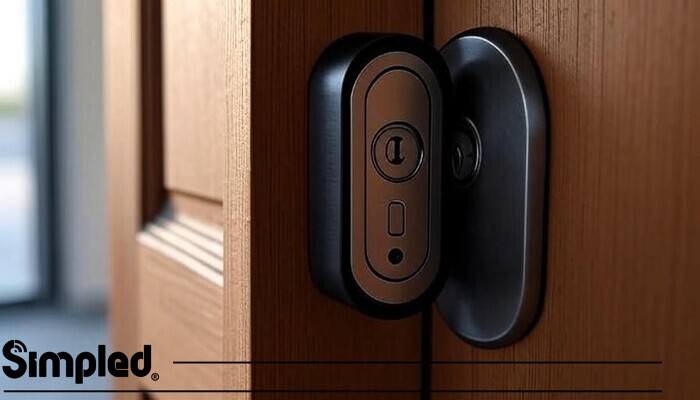
Double-sided smart locks are designed with active locking mechanisms on both sides of the door. Unlike traditional smart locks that typically secure only the exterior side and use a simple thumb-turn inside, double-sided models require authentication from either direction.
This design is particularly common in:
Frameless glass doors
Commercial entrances
Office partitions with restricted internal access
High-end residential glass entry doors
How They Differ from Standard Smart Locks
In standard smart locks, once someone gains access to the interior side of the door, unlocking is usually effortless. However, in a double-sided smart lock, both sides may require PIN, fingerprint, RFID, or app authorization. This adds an extra layer of controlled access.
Security Advantages
Prevents unauthorized exit in restricted areas
Suitable for shared buildings or controlled office spaces
Reduces internal security vulnerabilities
Enables full access tracking in both directions
Often integrates with access control systems
Conclusion: The Future of Smart Lock Security
Smart locks offer unmatched convenience, but like any technology, they come with their share of security issues. Understanding the potential risks and implementing best practices can significantly reduce the chances of encountering smart lock security problems.
By choosing high-quality smart locks, keeping software up to date, and prioritizing privacy, you can enjoy the benefits of keyless entry without compromising your home’s security.
At simpled, we understand the importance of balancing convenience and safety. Our smart lock systems are designed with cutting-edge security features, including strong encryption, anti-tamper mechanisms, and seamless integration with your home automation system.
With the right precautions, you can confidently embrace the future of home security with a smart lock system that works for you—securely and reliably.




Leave a Reply