

In a world where multitasking has become second nature, audiobooks have transformed how we read. And when you pair Audible with Amazon Alexa, you unlock an effortless, hands-free listening experience. Whether you’re cooking, commuting, or winding down for the night, Alexa can instantly play your favourite book — all you need is your voice.
This guide explores the top Alexa Voice Commands for Audible, setup tips, and smart ways to personalise your listening. You’ll also learn how smart home integrations — like Simpled smart locks — can complement your connected lifestyle.
Why Use Alexa with Audible?
Pairing Alexa with Audible brings simplicity and convenience together. Instead of manually browsing through your phone or app, you can command your Echo device to handle everything.
Key benefits include:
Completely hands-free control — perfect for busy mornings or while driving.
Seamless multi-device playback — start listening on Echo, continue on your phone.
Personalised experience — Alexa remembers where you stopped in your last audiobook.
Smart home synergy — combine listening routines with lights, thermostats, or locks for total automation.
Imagine saying, “Alexa, play my audiobook” while your smart lock secures the door and lights dim for bedtime. That’s effortless living.
How to Connect And play Audible on Alexa
- Open the Audible app and sign into your Amazon account
You will see the Audible logo (an open book with sound waves) upon opening the app, followed by a sign-in screen where you enter your Amazon credentials.
- Tap on your Profile at the bottom right corner of the screen
Look for a person-shaped icon or a tab labeled “Profile” located in the navigation bar at the very bottom right of your screen.
- Select the Settings (gear icon) at the top right
Once on your profile page, look for a small cog or gear-shaped icon situated in the upper right-hand corner.
- Tap on Alexa under the “App Settings” category
In the Settings menu, scroll down to the “App Settings” section. You will see an entry labeled “Alexa” with the familiar circular Alexa logo next to it.
- Toggle on Hands-free with Alexa
Inside the Alexa settings menu, find the “Hands-free with Alexa” option. It will have a sliding toggle switch next to it that turns from grey to blue (or orange) when activated.
- Follow the prompts to Agree and continue, and grant microphone permissions
A pop-up window or new screen will appear titled “You can now control Audible with voice. You will see a prominent button at the bottom labelled “Agree and continue. Following this, a system-level prompt (from iOS or Android) will appear asking for permission to “Record Audio” or “Access Microphone” with options to “Allow” or “While using the app”.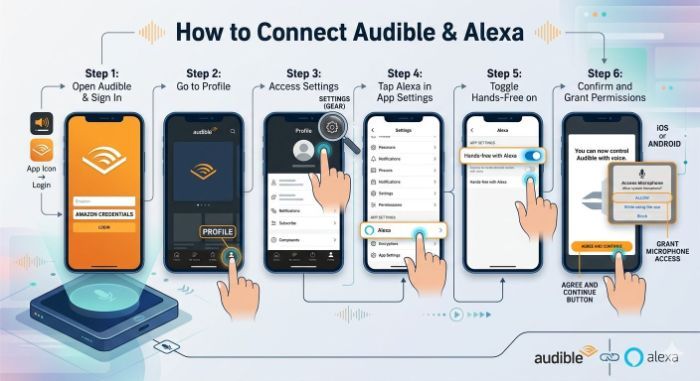
Best Alexa Commands for Audible (Everyday Use)
Once you’re set up, here are the most useful and time-saving Alexa Audible commands to remember.
1. Basic Playback Commands
These control your audiobook like a virtual remote:
“Alexa, play my audiobook.”
“Alexa, pause.”
“Alexa, resume my book.”
“Alexa, stop.”
“Alexa, go back 30 seconds.”
“Alexa, skip forward 1 minute.”
Perfect for when you’re washing dishes or driving — no screen required.
2. Selecting and Managing Books
If you own multiple audiobooks, Alexa helps you jump between them effortlessly:
“Alexa, read [book title].”
“Alexa, play the latest book from Audible.”
“Alexa, read my next audiobook.”
“Alexa, what’s in my Audible library?”
Expert Tip: You can even say, “Alexa, play the book I was listening to on my phone” — Alexa will pick up exactly where you left off.
3. Chapter and Bookmark Control
Want to skip or replay a specific section? Alexa makes it simple.
“Alexa, go to chapter three.”
“Alexa, next chapter.”
“Alexa, previous chapter.”
“Alexa, set a bookmark.”
Bookmarks are particularly useful for study sessions, podcast-style books, or reference guides.
4. Multi-Device Syncing Commands
If you switch between Echo devices or mobile listening, use these:
“Alexa, play my audiobook from where I stopped on another device.”
“Alexa, pause on this device.”
This feature is powered by Whispersync, a technology that keeps progress synced across all platforms.
5. Alexa Routines for Audible
Take your smart listening further by adding Audible to your Alexa routines.
For example:
Morning Routine: “Alexa, start my day” → turns on lights, reads the news, and plays your current audiobook.
Evening Routine: “Alexa, bedtime” → locks your door, dims the lights, and plays your relaxing book.
Fun and Creative Alexa Audible Commands
Alexa isn’t just about functionality — there’s a playful side too.
Try these fun voice interactions:
“Alexa, what’s my current book about?”
“Alexa, read me a sample from Audible.”
“Alexa, recommend an audiobook.”
“Alexa, play something relaxing on Audible.”
“Alexa, who’s the narrator of this book?”
For kids, you can even say:
“Alexa, read me a bedtime story.”
These simple touches make Alexa feel like your personal reading companion.

Troubleshooting Common Alexa Audible Issues
If Alexa isn’t playing your book or responding correctly, here are quick fixes:
1. Alexa says “I can’t find that audiobook.”
Check if your Audible and Alexa accounts are linked to the same Amazon account.
Ask, “Alexa, what’s in my Audible library?” to verify access.
2. Playback keeps stopping
Ensure your Echo device has strong WiFi.
Restart your device or unlink/relink Audible if issues persist.
3. Alexa plays from the beginning
Use “Alexa, resume my book” instead of “play” — it restarts from the last saved position.
Pro Tip: If you own multiple Echos, name them clearly in the app (e.g., “Living Room Echo”) to prevent confusion during playback.
Integrating Alexa & Audible with Your Smart Home
Listening to Audible doesn’t have to be limited to your Echo speaker. Combine it with your Smart Home Devices for a truly modern experience.
Example setups:
Play audiobooks through multi-room speakers during cleaning.
Trigger bedtime reading when Simpled smart locks secure your home.
Schedule relaxing audiobooks to play with dimmed smart lighting.
By linking Audible with your wider home ecosystem, you create a lifestyle that’s secure, efficient, and enjoyable.
Why Smart Lock Users Love Alexa Integration
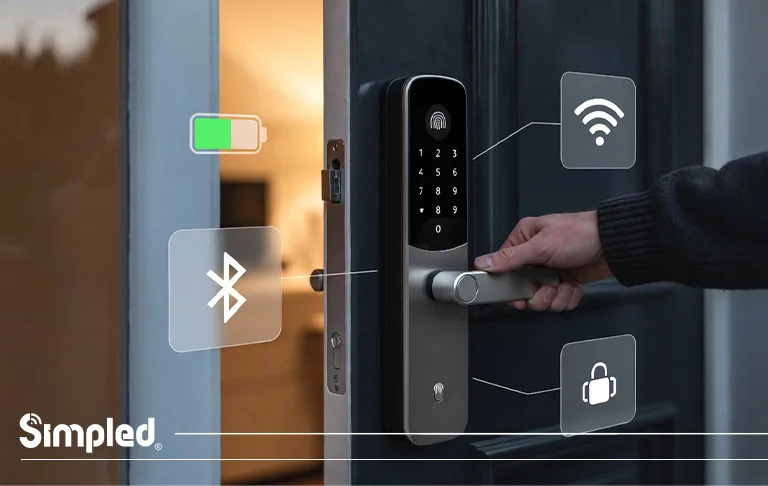
Smart home owners — especially those using Simpled smart locks — appreciate Alexa for its convenience and security synergy. You can check if your door is locked before bed while finishing a chapter.
Just say:
“Alexa, is my Simpled lock secured?”
“Alexa, lock the front door.”
This harmony between entertainment and safety defines the modern connected lifestyle.
Conclusion: Alexa + Audible = Effortless Listening
The beauty of Alexa Audible commands lies in their simplicity. With just your voice, you can control your entire audiobook experience — from selection and playback to syncing across devices.
Whether you’re relaxing after work or managing a busy household, Alexa turns reading into something seamless, immersive, and smart.
And when paired with Simpled smart home devices, your space becomes not just connected — but intelligently attuned to your rhythm.
FAQs
1. How do I connect Audible to Alexa?
You can link Audible in the Alexa app by navigating to Settings → Music & Podcasts → Link New Service → Audible.
2. Can Alexa read any book from Audible?
Yes, Alexa can play any audiobook in your Audible library once linked.
3. Can I use Alexa voice commands to control chapters on Audible?
Absolutely — say “Alexa, next chapter” or “Alexa, go to chapter three.”
4. Does Alexa remember where I left off on my audiobook?
Yes, Alexa uses Whispersync to continue exactly where you stopped, even across devices.
5. Can Alexa play Audible as part of my smart home routines?
Yes, you can add Audible playback to your Alexa routines alongside actions like locking doors or dimming lights.



Leave a Reply